
Say what you ate
Log a meal hands-free with voice. Include the food, approximate amount and known extras, then check the result.
Log homemade meals, snacks, and mixed plates without typing every ingredient. Snap, review the foods and portions, then save the result to your daily diary.
The current iPhone listing documents these four inputs. Pick the method that gives you the clearest food and portion information.
Log a meal hands-free with voice. Include the food, approximate amount and known extras, then check the result.
Use a barcode or nutrition label when you have packaging. Check the product and the number of label servings you ate.
For measured ingredients, use the label or food record to review the entry. Check the current version for dedicated manual-entry controls; the public listing does not specify them.
Source: Coach Ivy’s App Store listing, checked November 10, 2026. Logging features may have plan limits. See a practical portion-review guide.
The camera removes much of the typing, but the final judgment stays with you.
Keep the meal visible and use even lighting. A slightly overhead angle makes separate foods and portions easier to interpret.
Coach Ivy returns likely foods with calorie, protein, carbohydrate, and fat estimates. Change anything that does not match your meal.
Add the corrected meal to your diary and see how it fits your daily calorie and macro goals.
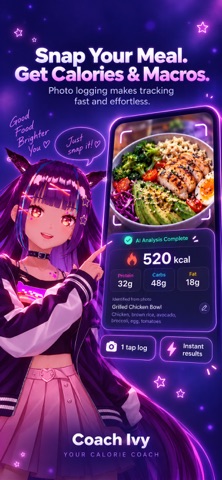
The official App Store preview illustrates a meal photo beside its calorie and macro estimate. Follow the same review habit with your own meals: check the foods, portions and anything the camera could not see.
Photo calorie counting is convenient because it estimates visible foods quickly. It is imperfect because a single image cannot reveal exact weight, ingredients below the surface, or how much oil was used in cooking.
Photo tracking is most valuable when manual entry would be slow enough to stop you from logging at all.
Capture several visible foods together, then review the ingredients and serving sizes before saving.
Get a practical starting point when there is no nutrition label, while adding sauces and oils you know are present.
Log quickly, but add a label or description when sugar, milk, or toppings are not obvious from the image.
Use the photo as a first pass, then correct overlapping foods, dressings, and ingredients below the surface.
Reduce the number of steps between eating and recording so the habit fits around school, work, or training.
Use estimates to learn patterns over time instead of letting the pursuit of perfect precision end the habit.
Coach Ivy does not need to replace every method. Photo logging is the fast option for ordinary meals; labels and scales still have a role when precision matters more.
| Method | Works best for | Speed | Main limitation | User correction |
|---|---|---|---|---|
| Coach Ivy food photo | Homemade and mixed meals | Fast | Hidden ingredients and portion depth | Yes |
| Barcode scan | Packaged foods | Fast | No help for most homemade meals | Usually |
| Manual search | Known foods and detailed entry | Slower | Database choice and typing friction | Yes |
| Scale + verified label | Tighter portion measurement | Slowest | High effort for every meal | Yes |
Compare free calorie tracking apps and their paywalls, explore macro tracking apps, or read our Cal AI alternatives guide. A free download and ongoing free photo analysis are different offers.
Coach Ivy is free to download on iPhone and currently offers a two-week trial. Check eligibility, included features, billing period and renewal price in the purchase screen. Its public listing does not specify all ongoing free photo or coaching limits after the trial.
Install Coach Ivy and explore its photo-first nutrition tracking experience.
In-app purchase options are listed. Check which features and ongoing usage the current offer includes.
The current Coach Ivy privacy policy says photos are transmitted over encrypted connections for AI analysis and then discarded. They are not kept as a permanent server-side food-photo library.
Coach Ivy is free to download on iPhone and currently offers a two-week trial. Check eligibility, included features, billing period and renewal price in the purchase screen. Its public listing does not specify all ongoing free photo or coaching limits after the trial.
Coach Ivy uses a food photo to estimate visible foods, calories, and macros. The result is an estimate and should be reviewed before saving.
Accuracy varies by the meal, photo, portion, and hidden ingredients. Simple visible foods are generally easier than mixed dishes, sauces, soups, and foods cooked with hidden oil.
Yes. Coach Ivy is designed so you can review and adjust detected foods and portions before saving a meal.
Use even lighting, keep the full plate visible, avoid heavy shadows, and photograph separate ingredients before mixing when practical. Tell the app about anything important that the camera cannot see.
Coach Ivy is currently available for iPhone and requires iOS 15.6 or later.
Coach Ivy is intended for general wellness and habit tracking, not medical nutrition therapy. Use clinician-guided methods when health decisions depend on tighter measurement.
Turn everyday food into a useful calorie and macro estimate without making meal logging your second job.