
Start with Cronometer or MyNetDiary for a documented ongoing free diary, MacroFactor for paid adaptive targets, or Coach Ivy for a character coach on iPhone. Cal AI centers its public pitch on photo-based tracking. Compare the daily experience and purchase terms: a free download does not establish free unlimited scanning in either app.
Six Cal AI alternatives, with Cal AI as a reference
Scroll sideways on a small screen. Source check: November 10, 2026.
| App | Photo / correction check | Other logging | Macros / coaching | Platforms | Ongoing free use or trial | Price |
|---|---|---|---|---|---|---|
| Coach Ivy | Photo estimates listed; review portions | Voice + barcode / labels listed | Daily macros; kawaii coach and chat | iPhone | Free install; two-week trial; ongoing limits unspecified | Current in-app offer |
| Cronometer | Gold Photo Logging; check matched foods | Barcode free; voice terms not established here | Detailed nutrients; Gold analysis tools | iPhone / Android / web | Basic ongoing free; Gold paid | Gold: current local offer |
| MyNetDiary | Premium Meal Scan; review matched foods | Barcode + basic voice free; AI voice: Plus | Free macros; AI Coach: Plus | iPhone / Android / web | Free diary; Premium / Plus paid | US Premium $59.99/year; Plus $99.99/year |
| MyFitnessPal | Eligible Premium Meal Scan; check foods / portions | Barcode + English voice: Premium | Free macro totals / percentage goals; paid coaching eligibility varies | iPhone / Android / web | Ongoing Free; Premium / Premium+ paid | Current local plan offer |
| MacroFactor | Photo / description input in paid app; inspect entries | Barcode + speech-to-text listed | Adaptive calorie and macro targets | iPhone / Android | Paid app; free trial; no ongoing free tier | US $71.99/year; verify trial |
| Lose It! | Premium photo input; inspect servings | Barcode + AI voice: Premium | Basic calories; advanced macros paid | iPhone / Android | Basic diary free; Premium paid | Current Premium offer |
| Cal AI (reference) | Photo scanning; verify correction controls | Barcode + description listed; voice access not established here | Calorie / macro breakdown; check coaching | iPhone / Android | Free install; scan analysis requires subscription | Current in-app offer |
Looking for a Cal AI free alternative?
Separate three questions: can you install it for free, can you keep a diary without paying, and can you keep getting photo analysis without a subscription? Cal AI’s listing answers the third explicitly: food-scanning results require a subscription. Coach Ivy’s listing confirms a free download and in-app purchases but does not publish every ongoing feature limit.
That evidence does not support calling Ivy an indefinitely free replacement for Cal AI’s paid scans. If your priority is a documented ongoing free diary, start with our free calorie app comparison. Cronometer and MyFitnessPal document free logging, with photo scanning handled separately in paid plans.
Before accepting any offer, check the trial length, what works after it ends, the renewal amount and the billing period. A store can list several purchase products, including older or promotional offers; that list alone is not a promise of the price you will receive.
Who should consider Coach Ivy?
Consider Ivy if you use an iPhone and like the idea of a nutrition diary with a character coach. Its public description combines food logging, macro totals, chat and habit features. The difference to evaluate is whether that experience suits you, rather than an unverified claim that one scan is faster or more accurate.

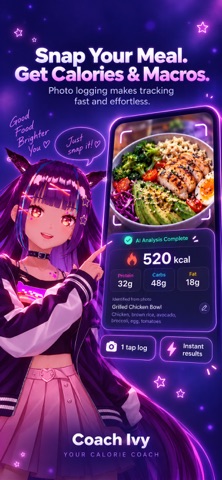
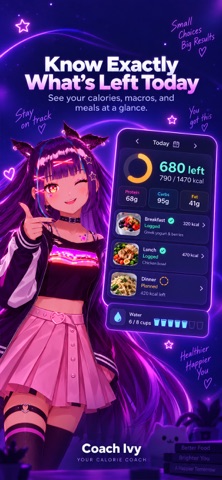
Official promotional screenshots from Coach Ivy’s App Store listing. They illustrate the workflow; they are not a controlled accuracy test.
Which alternative fits your reason for switching?
Cronometer: for nutrition detail and a free diary
Choose Basic when you want to search or scan packaged food and inspect nutrient totals without paying for photo convenience. Gold is the photo option. This is a better starting point than Ivy if detailed micronutrient records and a web diary are essential. A database result still needs the right food and serving.
MyNetDiary: for free barcode and basic voice input
Its free diary offers a useful route around a scan-only workflow. Meal Scan costs extra, and AI voice and coaching belong to Premium Plus. Its public pages disagree about custom-target access, as explained in our macro comparison; verify that particular feature in your version.
MyFitnessPal: for saved recipes and a familiar ecosystem
Free daily macros and percentage goals may be enough if you already have recipes there. Eligible Premium plans add Meal Scan, voice and barcode logging. Staying with an existing diary can be easier than moving your history. Read the MyFitnessPal comparison before switching.
MacroFactor: for paid adaptive targets
Consider it when adjusting targets from logged intake and weight trends matters more than having a free diary. Photo, description and barcode input are documented. Its trial is temporary, and the approach depends on the records you supply.
Lose It!: for a conventional calorie budget
Basic is an ongoing calorie diary. Photo input, AI voice, barcode scanning and advanced macro tracking are listed as Premium features. Check that the upgrade solves your specific logging problem before choosing it as a photo-first replacement.
What you may prefer about Cal AI
Cal AI is worth considering if you want a scan-centered workflow or need its Google Play option. Its official site describes photo, barcode and meal-description input. If your existing diary and subscription already meet your needs, check whether changing apps would solve a specific problem before starting again. We do not have evidence that switching to Ivy improves accuracy or retention.
Photo recognition still needs a portion check
For either workflow, compare the detected food with what is on your plate, check the amount and account for hidden ingredients. A photo cannot establish the precise oil absorbed in cooking or the weight of food underneath a sauce. Before subscribing, check the current app’s correction controls and try adjusting a familiar meal.
The Ivy photo workflow explains the review step. For the broader logging experience, see the AI calorie tracker page. Neither the feature matrix nor the promotional screenshots constitute an accuracy experiment.
What this comparison does not establish
- Unlimited free Ivy scans: current free-use limits need checking in the app.
- A direct diary import: there is no verified Cal AI-to-Ivy transfer described here.
- Android or web access for Ivy: choose another supported platform if either is essential.
- Identical integrations: verify Health, water, reminders and other details you rely on in each current version.
- Clinical or laboratory accuracy: photo nutrition totals are estimates for general wellness.
Before moving your routine
- Write down the features you use: scans, recipes, targets, history or integrations.
- Check the new app’s actual purchase screen and try entering a familiar meal.
- Save records you need using your existing app’s available options; do not assume an automatic import.
- Review your goal and starting targets during setup. Our macro calculator offers a separate starting estimate.
- Manage an existing subscription through its billing provider. Cal AI’s FAQ explains that deleting the app does not cancel it.
For more choices, compare AI calorie tracking apps or macro tracking apps. Choose the app that fits your actual logging habits and budget.
Frequently asked questions
Is Coach Ivy a free alternative to Cal AI?
Coach Ivy is an alternative to compare and is free to download, with in-app purchases. Its public listing does not establish unlimited free photo tracking. If you need a documented ongoing free diary, compare Cronometer Basic or MyFitnessPal Free; their free diary features are different from paid photo scans.
Is Cal AI free?
Cal AI is free to download, but its US App Store listing says food-scanning analysis results require a subscription. Check the trial, renewal price, billing period and cancellation terms shown for your account.
Which is more accurate, Coach Ivy or Cal AI?
We do not have a controlled head-to-head accuracy study. Both photo workflows produce estimates that depend on food recognition, portions and hidden ingredients. Test a familiar meal and check whether you can correct the result.
Does Coach Ivy offer Android or a web diary?
Coach Ivy is currently an iPhone app. Cal AI links to Apple and Google stores. If Android or browser access is essential, compare device support before moving your tracking routine.
Can I transfer my Cal AI food history to Coach Ivy?
This comparison does not establish a direct Cal AI-to-Coach Ivy import. Do not assume diary history or goals transfer automatically. Save any records you need using the options available in your existing app, then set up and check your new targets.
Does deleting Cal AI cancel its subscription?
No. Cal AI’s official FAQ directs users to cancel through Apple or Google subscription settings. Check the account that holds the subscription; deleting an app alone does not cancel billing.
Coach Ivy currently offers a two-week trial. Check the purchase screen for eligibility, included features, renewal price and billing period before starting. Ongoing free access after the trial is not established here.