
Start with Cronometer or MyFitnessPal for documented ongoing free logging. Compare six apps below by photo access, macros and paywalls; a free download alone does not establish free tracking.
On a small screen, scroll the table sideways to compare all columns.
| App | Usable free tier | Photo logging | Macro tracking | Phone support | Main paywall restriction | Best fit | Source check |
|---|---|---|---|---|---|---|---|
| Cronometer | Documented ongoing Basic tier | Gold | Macro and nutrient totals | iPhone / Android | Photo logging and extra analysis: Gold | Detailed free nutrition diary | November 10, 2026 |
| MyFitnessPal | Food diary and daily macro viewing | Eligible Premium Meal Scan | Daily viewing free; advanced tools paid | iPhone / Android | Meal Scan, barcode scan and deeper analysis: Premium | Recipes and familiar diary workflow | November 10, 2026 |
| Lose It! | Basic calorie diary | Premium | Advanced macro tracking: Premium | iPhone; check Android store | Photo, barcode and advanced tracking: Premium | A calorie budget and weight log | November 10, 2026 |
| Coach Ivy | Free download; two-week trial; ongoing limits not specified | Listed; check access | Listed; check access | iPhone | In-app purchases; verify exact feature limits | A kawaii coach and photo diary | November 10, 2026 |
| Cal AI | Free download; scan results paid | Subscription required for results | Included in scan workflow; subscription terms apply | iPhone / Android | Food-scanning analysis requires subscription | A scan-focused app to compare | November 10, 2026 |
| BitePal | Free download; two-week trial; ongoing limits not specified | Listed; check access | Listed; check access | iPhone; Android in help docs | Auto-renewing plans; verify feature access | A raccoon companion and meal feedback | November 10, 2026 |
Which logging shortcuts are free?
Scroll sideways on a small screen. Source check: November 10, 2026.
| App | Barcode / label | Voice | Free photo allowance |
|---|---|---|---|
| Cronometer | Barcode free | Not established in checked sources | None in Basic; Gold photo |
| MyFitnessPal | Premium barcode | Eligible English Premium | None in Free; eligible Premium Meal Scan |
| Lose It! | Premium barcode | Premium AI voice | Premium photo |
| Coach Ivy | Barcode / labels listed; check plan | Listed; check plan | Ongoing limit not publicly specified |
| Cal AI | Barcode listed; check plan | Not established in checked sources | Scan results require subscription |
| BitePal | Verify current app | Verify current app | Ongoing limit not publicly specified |
The strongest documented free options
Cronometer: start here for detailed nutrition
Choose Cronometer when you want to inspect nutrition beyond a calorie total. Its Basic account can be used without a time limit, and its product site includes free barcode scanning. The tradeoff is that Photo Logging requires Gold, so a free user should expect to search, scan labels or enter foods rather than rely on meal photos. That makes it a useful option for measured ingredients and readers who want more nutrient detail than this guide establishes for Ivy.
See the Basic account documentation and the Gold photo feature. A paid Gold plan can add convenience, but that is a separate decision from the value of Basic.
MyFitnessPal: free logging with recipes and daily macros
MyFitnessPal’s free plan supports food and exercise logging, recipes, measurements and daily macro viewing. It suits people who already have saved meals or prefer searching for familiar packaged foods. Meal Scan, barcode scanning and deeper analysis are Premium features in the current plan comparison; do not assume every logging shortcut is included for free.
Its established diary and recipe workflow may be a better fit than Ivy when those are your priorities, particularly if you also need Android or web access. Check the current plan breakdown rather than treating a paid-plan price as evidence that the free tier is better.
Lose It!: a basic calorie budget
Lose It! separates Basic calorie tracking from Premium tools. Its store listing puts photo meal logging, barcode scanning and advanced macro tracking under Premium. Consider Basic if you want to log calories against a budget. If protein, carbohydrate and fat targets are central to your routine, compare the actual Premium offer with the free macro options above before choosing.
Photo and companion apps: check the terms first
Coach Ivy: an iPhone diary with a kawaii coach
Coach Ivy combines meal logging and a character-led coaching experience. The public listing describes photo, voice and barcode/label input, nutrition chat and a daily calorie and macro diary. It is free to download with in-app purchases; the listing does not establish unlimited free scans or coaching. We cannot call it the best indefinitely free option on that evidence.
Consider Ivy if its visual approach makes food logging appealing to you. Choose another app if you need Android, a web diary or the deeper micronutrient reporting described by Cronometer. See the photo calorie counter workflow before installing.

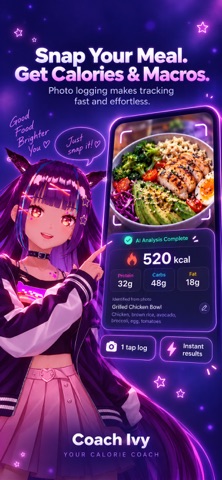
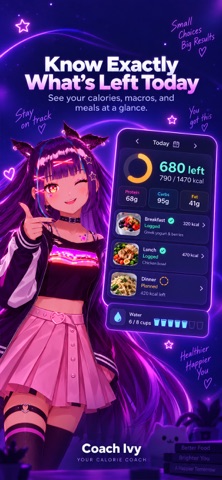
Official promotional screenshots from Coach Ivy’s App Store listing. They illustrate the workflow; they are not a controlled accuracy test.
Cal AI: scan results require a subscription
Cal AI by Viral Development LLC is a photo-focused option with barcode and description input. Its US App Store listing explicitly says food-scanning analysis results require a subscription. That makes it a paid photo-tracking option, even though installing it is free. Compare it with Ivy on the Cal AI alternative page; neither app earns an accuracy advantage from a feature list alone.
BitePal: a playful meal companion
BitePal describes photo logging, calorie and macro tracking, meal guidance and a raccoon companion. It is not simply a calorie-free food-quality journal. Its help center documents auto-renewing subscriptions but does not settle all free-use limits. If the pet approach appeals to you, check access to your daily totals and scans before committing.
How to choose a free calorie tracking app
- Define “free” for your routine. Is an ongoing searchable diary enough, or do you need photo estimates and custom macro goals without paying?
- Use the same familiar meal. Check whether you can enter its actual portion and add oil, dressing or a missing ingredient. There is no timed head-to-head experiment behind this guide.
- Check the platform. An iPhone-only app will not help if your diary needs to work on Android or the web.
- Read the purchase screen. Separate a download price, trial period, subscription renewal and feature limits. A discounted yearly offer is still a paid plan.
- Choose a diary you can understand. Clear corrections and readable totals matter more than an unsupported promise of speed, accuracy or retention.
Calories, macros and accuracy answer different questions
A calorie total describes energy; macros show protein, carbohydrate and fat. If macro targets drive your choice, use our macro tracking app comparison and daily macro calculator. For the broader product workflow, see the AI calorie tracker. If you want to understand photo estimation, read the AI app comparison and accuracy guide.
No app can see hidden oil or measure every serving from an image. Review estimates against what you know about the food. These tools support general wellness; use professional guidance for nutrition decisions that require clinical precision.
Frequently asked questions
What is the best free calorie tracking app?
Cronometer is our starting recommendation for a documented ongoing free tier with detailed nutrition tracking. MyFitnessPal is another option for free food logging and daily macro viewing. Choose by the features you can actually use without a subscription, rather than the download price.
Is Coach Ivy completely free?
Coach Ivy is free to download on iPhone and offers in-app purchases. Its public listing does not specify all ongoing free logging limits. Check the in-app offer before relying on photo logging or coaching without a subscription.
Are AI photo calorie trackers free?
Some apps are free to install while charging for scan results. Cal AI explicitly requires a subscription for food-scanning analysis; Cronometer reserves Photo Logging for Gold. Check feature access separately from the install price.
Can I track macros without paying?
Cronometer and MyFitnessPal document free nutrition and macro viewing. Viewing protein, carbohydrate and fat totals is different from custom targets, per-meal analysis or automated coaching, which may require an upgrade.
Which apps work on Android?
Cronometer and MyFitnessPal document iOS and Android apps. Cal AI links to both phone platforms. Coach Ivy is currently an iPhone app. Verify the current store listing for your device before choosing.
Is photo logging more accurate than weighing food?
A photo provides an estimate, not a measurement of exact food weight or hidden ingredients. For closer portion control, use weighed ingredients and the matching nutrition label or food record, and account for oils and sauces.
Coach Ivy currently offers a two-week trial. Check the purchase screen for eligibility, included features, renewal price and billing period before starting. Ongoing free access after the trial is not established here.