
Coach Ivy is an option for iPhone users who want a kawaii food diary and photo-based estimates. MyFitnessPal remains a useful choice for a broad logging ecosystem. Both now offer photo logging; the differences are the workflow, available plans and the experience you prefer.
Coach Ivy vs MyFitnessPal
| What matters | Coach Ivy | MyFitnessPal |
|---|---|---|
| Logging options | Photo, voice, barcode and food-label input listed in the App Store | Manual/search logging; eligible Premium Meal Scan, English voice and barcode scans |
| Calories and macros | Calorie and macro diary listed in the app | Food logging and macro viewing included in Free |
| Coaching | Ivy character and nutrition chat | Nutrition Coach for eligible Premium/Premium+ iOS members |
| Platform | iPhone; listing requires iOS 15.6 or later | iOS, Android and web; individual feature requirements vary |
| Cost | Free download with in-app purchases; check the current offer | Free, Premium and Premium+; price varies by country and term |
Sources: Ivy's listing, MyFitnessPal's plan comparison, Meal Scan requirements, and Nutrition Coach availability.
See the Coach Ivy experience

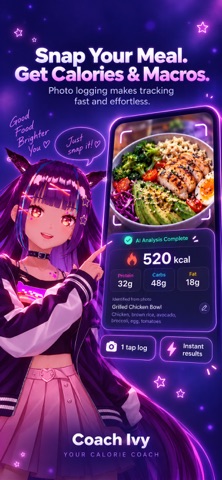
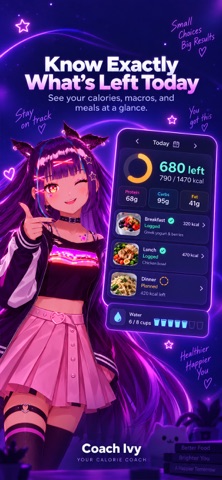
Official promotional screenshots from the Coach Ivy App Store listing. Check the current version and subscription options there before downloading.
When Coach Ivy may fit your routine
If you want a character-led diary on iPhone, Ivy puts photo logging and a friendly coach together. Try a meal you regularly eat, review the suggested foods and portions, and decide whether the workflow feels easier to repeat. Check what the current subscription offer includes before committing.
When keeping MyFitnessPal makes sense
Your saved recipes, diary history and existing integrations can make staying practical. If your main frustration is manual entry, check whether your MyFitnessPal plan and device already support Meal Scan before switching. A new app should solve a problem you actually have.
Compare the cost of the features you need
Coach Ivy currently offers a two-week trial. Check the purchase screen for eligibility, included features, renewal price and billing period before starting. Ongoing free access after the trial is not established here.
Free to download does not mean every feature is unlimited. Compare the current checkout offers for your country, including billing period, trial renewal, and the features you want. We do not present a single subscription price as universal.
How to try Ivy alongside your current diary
- Keep your existing history and recipes available.
- Download Ivy on a compatible iPhone and set up your goals.
- Log one familiar meal. Check the ingredients, portion and any hidden cooking fat.
- Compare the effort and usefulness of the result before choosing a diary.
This guide does not promise automatic transfer of MyFitnessPal history. For detailed nutrition rather than a character-led experience, compare the options in our AI calorie tracker guide. Read how photo estimates can vary before relying on either app's scan.
Frequently asked questions
Does MyFitnessPal have photo logging?
Yes. Its Meal Scan documentation describes a Premium feature for eligible iOS and Android devices. Check the current device, language and plan requirements.
Are macros free in MyFitnessPal?
MyFitnessPal lists macro viewing in its Free plan. More detailed analysis and additional tools depend on the plan.
Is Coach Ivy free?
Coach Ivy is free to download with in-app purchases. Check the current in-app offer for feature access, trial terms and renewal pricing.
Can I use Coach Ivy on Android?
The current Coach Ivy App Store listing is for iPhone. Choose a supported alternative if you need an Android app.
Make your food diary feel friendly
Explore photo logging, macros and coaching with Ivy. Free to download on iPhone; in-app purchases are available.
See Coach Ivy on the App Store