
Coach Ivy is our app. Comparison of official documentation; no hands-on ranking.
Seven macro apps: free totals, targets and logging
Scroll sideways on a small screen. Source check: November 10, 2026.
| App | Ongoing access | Macro totals | Custom macro targets | Photo logging | Voice / barcode | Platforms | Published price / trial | Best fit |
|---|---|---|---|---|---|---|---|---|
| Cronometer | Free Basic | Free | Free fixed grams / ratios; Gold scheduling | Gold; no ongoing Basic photo allowance | Barcode free; voice access not established here | iPhone / Android / web | Basic $0; Gold: current offer | Detailed nutrient tracking |
| MyFitnessPal | Free diary | Free daily totals | Percentages free; gram and meal/day controls paid | Eligible Premium Meal Scan | Barcode and English Voice Logging: Premium | iPhone / Android / web | Free $0; Premium / Premium+: current offer | Recipes and an existing diary |
| MyNetDiary | Free diary | Free | Free-plan page lists grams / percentages; see source conflict below | Meal Scan: Premium | Barcode and basic voice free; AI voice: Premium Plus | iPhone / Android / web | Premium $59.99/year; Plus $99.99/year (US) | Free barcode and basic voice |
| MacroFactor | Paid; free trial | Paid | Adaptive targets included in subscription | Included in paid app | Barcode and speech-to-text listed | iPhone / Android | US $71.99/year; trial, no ongoing free plan | Training and adaptive targets |
| Coach Ivy | Two-week trial; ongoing free limits unspecified | Listed; check plan access | Setup targets listed; custom controls need checking | Listed; ongoing allowance not published | Voice, barcode and labels listed; check plan access | iPhone | Two-week trial; check eligibility and renewal price | Photo diary and character coach |
| Lose It! | Free Basic calorie diary | Advanced tracking: Premium | Macro tools: Premium; check exact controls | Premium | Barcode and AI voice: Premium | iPhone / Android; verify store compatibility | Basic $0; Premium: current offer | Calorie budgeting with an upgrade |
| Carb Manager | Ongoing free use | Free daily macro logging | Custom daily goals; cycling: Premium | Current recognition access not established; meal photos alone are not recognition | Barcode free; Say voice: Premium | iPhone / Android / web | Free $0; Premium: current offer | Low-carb and net-carb tracking |
The best macro tracking app is the one that gives you the target controls and logging method you need at a price you accept. Our starting picks are Cronometer for a free nutrition diary, MacroFactor for paid adaptive targets, and Coach Ivy for readers who want a character-led photo diary on iPhone.
Free tracking
Cronometer for nutrition detail; MyFitnessPal for a familiar diary.
Training and adjustments
MacroFactor Nutrition if you want a paid app that adapts calorie and macro recommendations.
Photo diary and encouragement
Coach Ivy for a kawaii coaching experience on iPhone; verify the in-app offer.
Paid prices can differ by billing period, country and promotion. Where no single current offer is established, this table names the plan rather than guessing a monthly price. Free macro viewing, custom gram targets and per-meal analysis are separate features.
Cronometer: a strong starting point for free macro counting
Choose Cronometer if you want to inspect nutrient totals and log measured foods. Basic is an ongoing free account, with custom foods and recipes. Its detailed nutrition approach is useful when protein, carbohydrate and fat totals are only part of what you want to see. Photo Logging is Gold, so camera convenience is an upgrade decision.
For a beginner who wants a free app, this is a clearer starting point than an app whose public listing only says “free to download.” Expect to spend time choosing the right food record and portion.
MyNetDiary target caveat: its free-plan page lists custom gram and percentage goals as free, while its AI plan table places custom targets under Premium. These public pages disagree. Confirm the target editor in your version before paying for this specific feature.
MyFitnessPal: useful for recipes and an existing diary
The free plan includes daily macro viewing and recipe creation. If you already log meals there, first check whether its free nutrition screen answers your question before changing apps. Percentage macro goals are free. Gram targets, meal/day controls, barcode scans and eligible voice/meal scans require Premium. Do not confuse seeing your daily macro totals with setting a different target for each meal.
Its established search-and-recipe workflow is a reason to choose it over Ivy if you value keeping those entries or using a web diary. Our MyFitnessPal alternative guide explains where Ivy may fit a different routine.
MacroFactor Nutrition: paid targets that adjust over time
MacroFactor uses logged intake and body-weight trends to inform calorie expenditure estimates and update nutrition targets. That makes it a candidate for bodybuilding or other training routines where ongoing target adjustments matter. It has photo input as well as database and barcode options; it should not be described as manual-only.
The official FAQ lists no ongoing free version and a US annual price of $71.99. Review the trial, billing period and current purchase screen. Its approach also depends on the information you record: partly logged days can distort the picture. Prefer another option if you only want a free diary or do not want to record the inputs its adjustments use.
Coach Ivy: photo logging with a character coach
Ivy’s store listing describes a calorie and macro diary alongside photo input and nutrition chat. Consider it if a visual diary and a friendly character make logging easier to approach. It is available for iPhone and is free to download with in-app purchases; public information does not establish every ongoing free-use limit.
Choose Cronometer for the nutrient detail documented above, MacroFactor for its documented adaptive workflow, or a cross-platform diary if Android or web access is essential. Ivy is one option in this comparison, not an automatic winner for every reader.

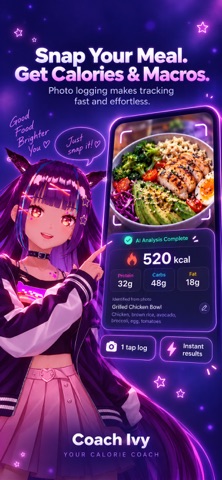

Official promotional screenshots from Coach Ivy’s App Store listing. They illustrate the workflow; they are not a controlled accuracy test.
Lose It!: check Premium if macros are the goal
Lose It! lists a free Basic calorie diary, while advanced macro tracking and photo input are Premium features. It is worth considering if you like a conventional calorie-budget workflow and might later add macro tools. If your requirement is ongoing free macro tracking, compare Cronometer and MyFitnessPal first.
MyNetDiary: free barcode and basic voice logging
Consider MyNetDiary if a searchable diary and packaged-food workflow matter more than a character companion. Its free-plan documentation includes macro totals and basic voice input. Meal Scan is a Premium feature, while the newer AI voice and coaching toolkit belongs to Premium Plus. These are distinct features, so do not assume that free voice entry includes the paid AI workflow.
The documented US annual subscriptions are $59.99 for Premium and $99.99 for Premium Plus. The custom-target documentation conflict above is a reason to inspect your actual app before subscribing.
Carb Manager: daily goals for a low-carb routine
Carb Manager offers macro logging, custom daily goals and free barcode scanning. Premium adds Say voice logging, macro cycling and deeper reports. It suits readers who want to distinguish total and net carbs; that focus is not a reason everyone needs a low-carb diet. Confirm how your chosen app defines carbs before comparing totals.
We have not established a current photo-recognition allowance from the checked help pages. Attaching a meal photo to a diary is different from extracting nutrition from that photo.
Macros versus calories: decide what you want to track
Calories summarize energy. Macros separate protein, carbohydrate and fat, so two days with similar calories can have different macro totals. An app can display those totals without giving you full control over targets. Before subscribing, check whether it supports the gram targets, meal breakdowns and corrections that your routine needs.
A macro counting app records what you eat; a calculator estimates a starting daily target. Use our macro calculator for that starting point, then compare it with your circumstances and professional guidance where appropriate. Calculating daily needs is a different task from calculating one particular meal.
Photo estimates versus weighing and barcodes
A camera can suggest foods and portions, but it cannot reveal all cooking fats or weigh what is under the visible surface. For a packaged food, check the serving size on its label. For a homemade recipe, weigh ingredients and record how much of the finished recipe you ate. For a restaurant plate, review the photo estimate and add known sauces or extras.
There is no controlled accuracy ranking behind this guide. Try a familiar meal, inspect the matched foods and test whether you can correct the amounts. Read the photo workflow and the accuracy guide for practical examples.
A short checklist before you choose
- Free means ongoing access: distinguish a free diary from a temporary trial.
- Targets and totals differ: confirm whether custom grams, meal targets or advanced reports need payment.
- Corrections matter: verify that the saved entry can match the portion you ate.
- Check your device: iPhone, Android and web support can differ.
- Pick the right comparison: use our free calorie app roundup for budget-first choices or Cal AI comparison for scan-focused choices.
Frequently asked questions
What is the best macro tracking app?
Start with Cronometer for detailed free nutrition tracking, MyFitnessPal for an established recipe diary, MacroFactor for paid adaptive targets, or Coach Ivy for a character-led iPhone photo diary. The best choice depends on your logging method, target controls and budget.
What is the best free macro tracking app?
Cronometer is our starting choice for a documented ongoing free nutrition diary. MyFitnessPal also includes daily macro viewing for free. Verify custom goal and analysis requirements separately; a free install or trial does not establish an ongoing free macro plan.
Can I count macros with a photo?
Photo apps estimate protein, carbohydrate and fat from the foods and portions they identify. Review the matched foods, amounts and hidden cooking ingredients. A photo does not measure exact food weight.
Which macro counting app is best for beginners?
Pick one with a diary you can read and entries you can correct. Start with calories and protein if tracking all three macros is overwhelming, and choose targets appropriate for your circumstances. A clinician or dietitian can help with individual needs.
Is MacroFactor free?
MacroFactor Nutrition is a paid app with a free trial and no ongoing free tier. Its official FAQ lists a US annual price of $71.99; confirm the current subscription, trial and renewal terms before purchase.
Does Coach Ivy work on Android?
Coach Ivy is currently available for iPhone. Cronometer, MyFitnessPal and MacroFactor offer mobile options through Apple and Google stores; check current device compatibility.
Coach Ivy currently offers a two-week trial. Check the purchase screen for eligibility, included features, renewal price and billing period before starting. Ongoing free access after the trial is not established here.
Once you choose a diary, follow our step-by-step macro tracking guide and try the seven-day macro meal plan with editable comparisons.