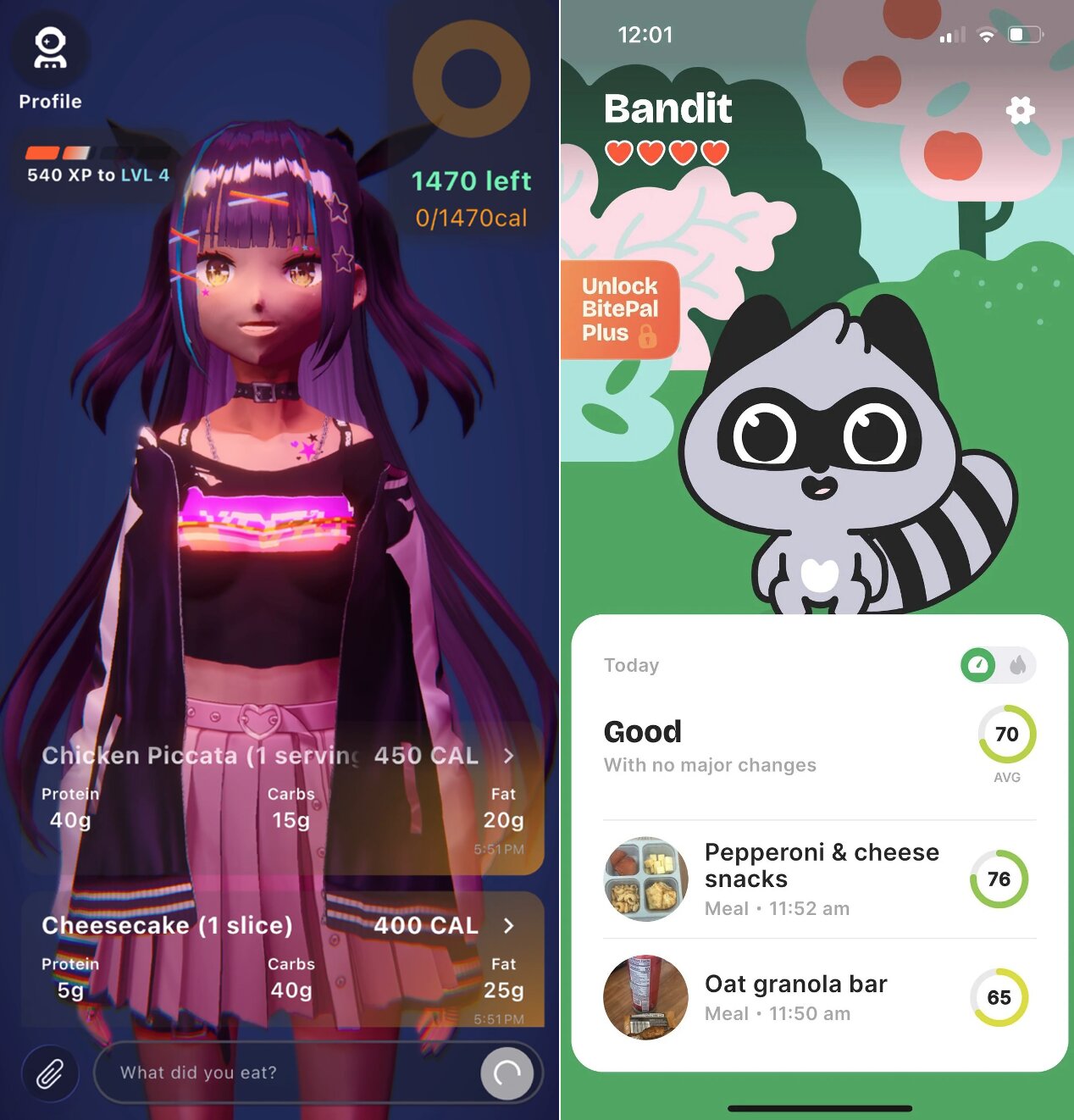
Food tracking apps have changed dramatically in the past few years. The dominant players — MyFitnessPal, Cronometer, Lose It! — built their models on manual food-database entry. The new generation — Coach Ivy, Cal AI — flipped the paradigm: point a camera at your plate, get your macros back in seconds.
The question isn't just "which app has the most features." It's which combination of features, friction, and experience actually produces consistent daily logging — which is the only thing that makes any food tracker useful.
In this article
How we evaluated these apps
We scored each app across five dimensions. Here's exactly what we measured and why:
Food database quality. Not just size — accuracy matters too. A database with 14 million entries is only useful if those entries are correct. We looked at both the breadth of items available and whether user-submitted entries were verified or crowdsourced without review. USDA-backed data (Cronometer) is the gold standard. AI-estimated data (Coach Ivy, Cal AI) is practical but involves estimation ranges rather than exact values.
Logging friction. We timed how long it took to log a typical home-cooked meal (chicken stir-fry), a restaurant order (burrito bowl), and a snack (apple and peanut butter) in each app. Photo-based apps were dramatically faster for mixed meals. Database apps were faster for exact branded items with barcodes. We weighted this heavily because it's the primary predictor of whether people actually keep tracking.
AI features. Photo recognition accuracy, how the app handles portion estimation, and whether the AI goes beyond just logging (coaching, suggestions, pattern recognition). Coach Ivy's AI coach is in a category of its own here — it's the only app that uses AI for behavioral coaching rather than just calorie estimation.
UI polish and UX design. Does the app feel good to use every day? Is the information hierarchy clear? Does the feedback feel motivating or discouraging? This is subjective but important — no one stays with an app that feels unpleasant to open.
Pricing transparency. What do you actually get free versus what's locked? We were specifically looking for bait-and-switch tactics (collecting habit data and then paywalling it), hidden subscription prompts, and genuine value in free tiers.
Coach Ivy
Free (core) · iPhone · AI photo logging · Kawaii AI coaching
Coach Ivy earns the top overall spot because it's the only app that solves both of food tracking's biggest problems simultaneously: logging friction and motivation. Every other app on this list solves at most one of these well.
The core mechanic is elegant: take a photo of your meal. Coach Ivy's AI identifies the foods, estimates portion sizes, and returns a full macro breakdown — calories, protein, carbs, fat — in a few seconds. For mixed dishes (a grain bowl, a plate of pasta with vegetables and protein), this is dramatically faster and often more realistic than manually searching a database and guessing whether your serving was "1 cup" or "1.5 cups."
The coaching layer is what makes it unique. Ivy is a kawaii anime character with genuine warmth in her feedback. She celebrates streaks, encourages you after a tough day, and suggests recipes that fit your remaining macros. The design is deliberately positive — there are no shame spirals, no red calorie counters implying you ate too much, no guilt-based feedback loops. This isn't just an aesthetic choice; it's a product philosophy built on the evidence that positive reinforcement produces better habit adherence than negative feedback.
Water tracking, daily streak management, and personalized recipe ideas round out the feature set. Core tracking is free. The app is currently iPhone-only, with Android in development.
Pros
- Fastest meal logging of any app tested
- Kawaii AI coach — genuinely motivating, not gimmicky
- Positive-only feedback design (no shame mechanics)
- Core features genuinely free
- Streak + habit system built in
- Recipe suggestions based on remaining macros
- Clean, intentional UI with no feature bloat
Cons
- iPhone only (no Android yet)
- No barcode scanner
- Manual food catalog smaller than MFP
- AI photo estimates involve ranges, not exact values
MyFitnessPal
Free limited / $19.99/mo Premium · iOS & Android · 14M+ food entries
MyFitnessPal has a legitimate claim to one title: the world's largest food database. Over 14 million entries, including a huge catalog of branded products, restaurant chain items, and foods from dozens of countries. Its barcode scanner is the fastest and most reliable of any app here. If you're logging a packaged protein bar, a specific yogurt brand, or a dish from a major chain, MFP will usually have it.
The challenge is that everything else has aged. The interface is cluttered by years of accumulated features. The free tier has been progressively restricted — macros, detailed nutrition reports, and calorie adjustments for exercise now all require the $19.99/month Premium subscription. There are ads on the free version. And the calorie feedback design — numbers turning red when you're over budget — creates a punitive experience that research suggests leads to tracking abandonment rather than behavior change.
MFP's AI photo feature exists but is secondary to its database approach. It works for simple foods but isn't built around the photo-first workflow the way Coach Ivy is. If you're a power user who needs the biggest database and you're willing to pay for Premium, it's still the most comprehensive tool available. For everyone else, it's probably more app than you need.
Pros
- 14M+ food entries — largest database available
- Best barcode scanner for packaged foods
- Exercise calorie tracking and adjustment
- Broad third-party integrations (Garmin, Fitbit, Apple Health)
- Cross-platform (iOS + Android)
- Established community and social features
Cons
- Most features now require $19.99/mo Premium
- Interface feels cluttered and dated
- Ads on free tier
- Punitive red-number feedback design
- AI photo logging not a core feature
- User-submitted entries not always verified
Cronometer
Free / $9.99/mo Gold · iOS & Android · 80+ nutrients tracked
Cronometer occupies a unique position: it's not trying to be a consumer wellness app. It's a precision nutrition tracking tool, and it excels at that specific function. While other apps track calories and maybe macros, Cronometer tracks over 80 nutrients — including all vitamins, minerals, amino acids, and fatty acids — against established dietary reference intake values. The data comes from USDA and verified scientific databases rather than crowdsourced entries, which means the accuracy is genuinely superior for nutrients beyond just calories.
The practical use case for Cronometer is specific: people managing health conditions (thyroid, autoimmune, cardiovascular), people working with registered dietitians who need precise intake reports, athletes on specialized nutritional protocols, and anyone doing targeted elimination or reintroduction diets. If you need to know whether you're hitting your RDI for zinc, manganese, or B12, no other app comes close to Cronometer's reliability.
There's no AI photo recognition, no coaching character, and no habit-building mechanics. Cronometer is a measurement instrument. The free tier is genuinely generous — most core tracking features work without Gold. The Gold upgrade adds nutrition scores, a fasting tracker, and an ad-free experience for $9.99/month, making it the most affordable premium tier of any app here.
Pros
- 80+ nutrient tracking — nothing else matches this
- USDA-verified data quality
- Amino acid and fatty acid breakdowns
- Most affordable Gold tier ($9.99/mo)
- Excellent for clinical and dietitian use cases
- Generous free tier
Cons
- No AI photo logging at all
- Steep learning curve — not beginner-friendly
- Zero coaching, personality, or habit features
- Data-dense interface can be overwhelming
- Manual entry only for every meal
Lose It!
Free limited / $39.99/yr Premium · iOS & Android · Snap It AI photo
Lose It! wins the "best free option" category for a specific reason: its Premium tier at $39.99/year works out to $3.33/month — the most affordable paid tier of any full-featured calorie tracker. The free version includes calorie tracking and basic food logging, and the Premium upgrade unlocks macro targets, nutrient reports, and meal planning.
The design philosophy is weight-loss focused and visual. The calorie budget ring — a circular progress indicator that fills as you log meals — is one of the most intuitively clear "are you on track?" displays in any app. You don't need to think about it; you just glance at the ring and know where you stand. This works extremely well for users whose primary goal is calorie management for weight loss.
The "Snap It" AI photo feature is included and works reasonably well for simple, identifiable foods. For complex mixed dishes, it's less accurate than Coach Ivy or Cal AI. Lose It! is also the most stripped-back of the traditional apps in terms of personality — there's no coaching character, no encouragement mechanics, and no streak system. It's a clean, functional tool that does the calorie-counting job without trying to be anything more.
Pros
- Most affordable Premium tier ($39.99/yr)
- Clearest visual calorie budget ring
- Snap It AI photo logging included
- Clean, uncluttered interface
- Cross-platform (iOS + Android)
- Good for straightforward weight-loss goals
Cons
- AI photo accuracy behind dedicated AI apps
- Free tier quite limited beyond calorie logging
- Weight-loss framing may not suit everyone
- No personality, coaching, or habit mechanics
- Less database depth than MFP
Cal AI
Subscription required · iOS & Android · AI photo-first
Cal AI earned its place by going viral on TikTok for doing one thing extremely fast: AI calorie recognition from a phone photo. The app is intentionally minimal — there's almost no interface beyond the camera and the result. For users who want a single-purpose tool with zero learning curve, that minimalism is the appeal.
The recognition speed and accuracy are genuinely impressive for a purpose-built photo AI. Cal AI processes meals quickly and handles a wide variety of foods reasonably well. What it doesn't do is everything else — no coaching, no streaks, no macro coaching beyond calorie totals, no recipe suggestions, no habit tools. It's a pure number-spitter.
The commercial model is a weakness: full use requires a paid subscription, which means you're paying specifically for AI photo estimation — the one thing Coach Ivy also offers, free, with significantly more depth around it. For Android users who want photo-based logging and can't use Coach Ivy yet, Cal AI is the natural alternative.
Pros
- Extremely fast AI photo recognition
- Dead-simple interface — zero learning curve
- Cross-platform (iOS + Android)
- Strong viral word-of-mouth for a reason
Cons
- Paid subscription required for all features
- No coaching, streaks, habit features, or personality
- Single-feature app — AI photo estimation only
- Limited macro breakdown detail
- Coach Ivy does the same thing free, with more depth
BitePal
Free / BitePal Plus · iOS · Pet raccoon mascot · Food health scoring
BitePal takes a genuinely different angle on food tracking: instead of logging for your own macros, you're feeding your pet raccoon, Bandit. What you eat affects Bandit's mood and health — four hearts go up when you make better choices — and each meal gets a 0–100 health score rather than just a calorie count. Log pepperoni and cheese snacks and you get a 76; an oat granola bar scores 65. Your daily average tells you the quality of the day, not just the quantity.
That shift from quantity to quality is BitePal's strongest differentiator. It's not asking "how many calories did you eat?" — it's asking "how healthy was that choice?" For users who find calorie math stressful or punishing, this reframe can make logging feel genuinely approachable. The pet mechanic creates a low-pressure accountability loop: Bandit needs you to log meals to stay happy, which nudges daily engagement without guilt or red numbers.
BitePal Plus unlocks additional features beyond the free tier. It's currently iOS-focused, with a clean and cheerful design that leans into the companion-game aesthetic. It won't suit power users who need precise macro breakdowns, but for habit-building around food quality, it's one of the more creative approaches in the market.
Pros
- Unique pet raccoon companion (Bandit) — genuinely engaging
- Health score framing shifts focus from calories to food quality
- Low-pressure, game-like accountability loop
- Clean, cheerful interface with strong visual identity
- Great for users who find calorie counting stressful
Cons
- Less macro/calorie precision than traditional trackers
- BitePal Plus subscription needed for full feature set
- Pet mechanic may feel gimmicky for data-focused users
- Smaller food database than MFP or Cronometer
Full comparison table
| App | iOS | Android | AI Photo | Coaching | Free Tier | Paid Price | Best For |
|---|---|---|---|---|---|---|---|
| Coach Ivy | Yes | Coming | Yes (primary) | Kawaii AI | Full core | Free core | Overall + photo |
| MyFitnessPal | Yes | Yes | Limited | None | Limited | $19.99/mo | Database depth |
| Cronometer | Yes | Yes | No | None | Generous | $9.99/mo | Micronutrients |
| Lose It! | Yes | Yes | Yes (Snap It) | None | Basic | $39.99/yr | Budget/free option |
| Cal AI | Yes | Yes | Yes (only) | None | No | Subscription | Simplicity |
| BitePal | Yes | — | No | Pet raccoon | Limited | BitePal Plus | Food quality / gamification |
The case for switching from manual tracking to AI photo logging
Why people quit food trackers — and what fixes it
The single biggest predictor of whether someone sticks with a food tracking app is logging friction — how many steps and how much time it takes to record a meal. Multiple behavior change studies have found that adding as few as 2–3 extra steps to a habit dramatically reduces its daily completion rate.
Manual food diary logging involves: opening the app, searching the food database (often requiring multiple searches for a single multi-ingredient meal), identifying the correct entry, estimating the serving size in units that match the database entry, logging it, then repeating for each component of the meal. For a chicken stir-fry with four ingredients, that's easily 3–5 minutes and 15+ steps.
AI photo logging: open app, take photo, confirm the result. Under 15 seconds. Same information. This reduction in friction is why apps with photo-based logging consistently show 2–3x higher 30-day retention rates compared to manual-entry apps — even when users report caring about accuracy.
The counter-argument is accuracy: photo-based estimates involve uncertainty ranges, while database entries have exact values. This is true. But a consistent "approximately right" log over 30 days produces better outcomes than a perfectly accurate log for 8 days before abandonment. Adherence beats precision for most nutrition goals.
What features actually matter (and which are just noise)
Matters: Logging method. Photo vs. database vs. barcode — this determines whether you'll actually log meals every day. Choose a method that matches how you eat, not the most technically impressive option.
Matters: Free tier quality. A tracker that locks macro targets behind a paywall after two weeks of free use is a recurring subscription you didn't budget for. Know what you're getting before you build a habit around an app.
Matters: Feedback tone. Apps that make you feel bad about what you ate cause tracking abandonment. Apps that celebrate progress and treat imperfect days as normal cause habit formation. This sounds soft but shows up consistently in retention data.
Matters: Macro tracking depth. If your goal requires protein management (building muscle, recovering from illness, hitting targets set by a dietitian), you need per-meal macro breakdowns — not just daily calorie totals. Make sure your app tracks protein at the entry level, not just the day level.
Noise: Social features. In-app community sharing and friend comparisons sound good in demos and almost no one uses them consistently. Don't choose an app for its social features.
Noise: Third-party integrations (for most users). Syncing with Garmin or Fitbit for exercise calorie adjustment matters if you're training seriously and want precise TDEE management. For most people tracking eating for general health, this feature is irrelevant and adds UI complexity.
Noise: Recipe libraries. Most apps with built-in recipe features have underused libraries. The exception is Coach Ivy's AI-suggested recipes based on your remaining macro budget — that's a genuinely useful feature because it's personalized rather than generic.

Coach Ivy is the food tracking app that takes the friction out
Snap a photo of your meal, let your kawaii AI coach handle the numbers. Free on iPhone — no paywall for the things that matter.
Download Coach Ivy FreeFrequently asked questions
What is the best food tracking app in 2026?
Coach Ivy is the best overall food tracking app for most users in 2026 — it combines AI photo logging with a kawaii AI coaching character and is free on iPhone. MyFitnessPal is the best for database depth (14M+ entries). Cronometer is best for micronutrients. Lose It! offers the most affordable paid tier. The "best" app depends on what you actually need from tracking.
Which food tracking app is most accurate?
For packaged foods with nutrition labels, MyFitnessPal and Cronometer (USDA data) are most accurate. For mixed and restaurant meals — which is most of what people actually eat — AI photo apps like Coach Ivy and Cal AI often produce more realistic estimates than manual database lookups, because users tend to incorrectly identify or under-estimate portions when searching a database manually. Cronometer wins for verified micronutrient data across the board.
Is MyFitnessPal still worth using in 2026?
For power users who eat a lot of packaged and branded foods, yes — its 14M+ database and barcode scanner are genuinely unmatched. For everyone else, the progressive paywall (macro targets, nutrition reports, and exercise calorie adjustments now require $19.99/month), cluttered UI, and guilt-tone feedback make it hard to recommend over newer alternatives. Coach Ivy is better for daily logging experience; Cronometer is better for data depth.
What food tracking app is genuinely free?
Coach Ivy's core features — AI photo logging, macro tracking, water tracking, streak system, and AI coaching — are genuinely free on iPhone. Cronometer has a strong free tier for micronutrient tracking. MyFitnessPal and Lose It! both have free tiers but restrict the most useful features (macro targets, detailed reports) behind paywalls. Cal AI requires a subscription for all features.
What is BitePal and how does it work?
BitePal is a food tracking app built around a pet companion mechanic — your raccoon, Bandit, reacts to what you eat. Instead of tracking pure calories, BitePal scores each meal on a 0–100 health scale, so the focus is on food quality rather than quantity. The pet's happiness (shown as hearts) nudges you to log consistently without guilt-based feedback. A BitePal Plus subscription unlocks additional features beyond the free tier. It's a good fit for users who find calorie counting stressful and prefer a game-like approach to building healthier eating habits.
Why do people stop using food tracking apps?
Logging friction is the primary cause — every extra step between eating and logging dramatically reduces how long someone maintains the habit. Manual database searching takes 2–5 minutes per meal. Photo-based logging takes under 15 seconds. Apps with photo-first logging consistently show 2–3x higher 30-day retention rates. Negative feedback design (shame, red numbers, punitive framing) is the second most common cause of abandonment. Apps built around positive reinforcement — like Coach Ivy — show meaningfully better long-term retention.